Display ACF Fields in a Divi 5 Loop Builder Card
A Loop Builder card can show a post’s title and featured image, but custom content such as a person’s role or location lives in ACF fields. Connect those fields as dynamic content and Divi can display the right values on every card.
Check the ACF field group and content
Use a custom post type that already has an ACF field group. For this example, imagine a Team Member post type with simple text fields named Role and Location. In ACF, confirm the field group’s location rule targets that post type. Open two published sample posts and enter values for those fields.
Add a Divi 5 Loop Builder card
Open the page where the cards should appear in the Visual Builder. Add a section and row, then add a column to act as the card container. Give the column a background, padding, and border radius so its modules read as one card.
Set the loop query to your custom post type
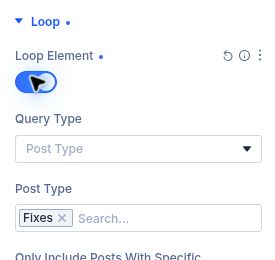
Select the card column and open Content → Loop. Enable Loop Element. Set Query Type to Posts, choose your custom post type, and set the number of posts to display. Keep the query focused on the content you want in this grid.
Add the post image and title dynamically
Inside the looped column, add an Image module and connect its image to Loop Featured Image. Add a Heading module and connect its text to Loop Post Title. These standard loop fields make each card identifiable before you add custom details.
Connect an ACF field to a Text module
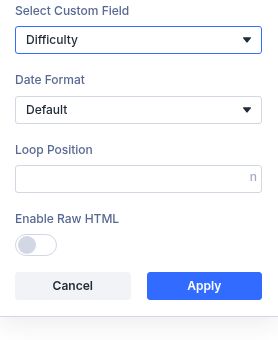
Add a Text module for a custom value such as Role. Click the Dynamic Content icon for the text field, choose Loop Post Custom Field, open Select Custom Field, choose the ACF field label, and click Apply. Add another Text module and repeat for Location if needed.