
Create a Custom 404 Page with Divi 5 Theme Builder
A generic not-found page leaves visitors at a dead end. A custom 404 page can explain what happened and give people a clear way to search or return to useful parts of your site.
Open the Theme Builder
From the WordPress Dashboard, go to Divi → Theme Builder. This is where Divi assigns templates to special pages such as search results and 404 pages.
Create a template for the 404 page
Choose Add New Template → Build New Template. In Template Settings, scroll to Other, check 404 Page, and click Create Template. Do not choose Search Results; that is a separate page type.

Build the custom body
On the new 404 template card, choose Add Custom Body → Build Custom Body. Divi opens the Visual Builder for the content shown when a visitor reaches a missing URL.
Add a clear not-found message
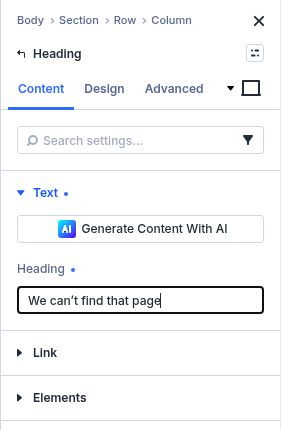
Add a one-column row and a Heading module. Use a direct headline such as “We can’t find that page.” Follow it with a Text module explaining that the link may be outdated and offering a next step. Keep the message short and helpful.
Give visitors useful ways forward
Add a Search module so visitors can search the site. Add a Butto