Build a Dynamic Single Template for a Custom Post Type in Divi 5
A custom post type can have useful content and fields but still inherit a page layout that does not fit it. A Divi Theme Builder template gives every item in that post type a consistent design while keeping its own title, image, and content.
Make the post type available to Divi
In WordPress, open Divi → Theme Options → Builder → Post Type Integration. Enable the post type you want to design, then save the options. If it is already enabled, leave it as is. Have at least one published item ready to preview.
Create and assign a Theme Builder template
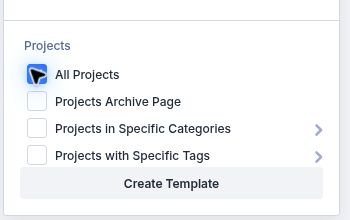
Go to Divi → Theme Builder, choose Add New Template, then Build New Template. In the assignment list, select All Projects as the example custom post type, or choose the matching All [your post type] option. Click Create Template. Check existing assignments before saving: a newly assigned template can replace the earlier assignment for the same content.
Add a custom body
In the new template card, choose Add Custom Body → Build Custom Body. The Visual Builder opens with an empty body area. Keep the existing site header and footer if you want this content type to use the normal site frame.
Build the dynamic title area
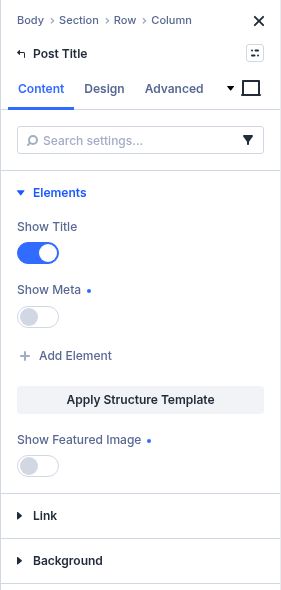
Add a row and insert the Post Title module. In Content → Elements, choose whether to show the title, meta details, and featured image. Style the title and image in the Design tab. These fields pull from the item being viewed instead of using one hard-coded title.